
Modern React apps lean heavily on local state and async side effects (fetching data, debounced handlers, timers, transitions). If your tests don’t model those behaviours accurately, you’ll ship brittle UI and flaky tests.
This post tackles three common pain points and shows reliable test patterns with React Testing Library (RTL) + Jest/Vitest.
Common issues developers face
- State updates not reflecting immediately
React batches updates and applies them after the current event tick. In tests, that can look like “my assertion ran before React updated the DOM.” - Testing async side effects (fetch, timers, debounced inputs)
You must wait for the side effect to finish or control the clock otherwise you’ll assert too early. - Misunderstanding the rendering lifecycle
Effects run after paint, React 18 auto-batches updates, and state updates triggered by promises/timers need you to await or advance timers.
What you’ll learn
- A quick mental model for React state and effects in tests
- When to use
findBy*,waitFor, andact - How to test timers, debounces, and fetches without flakiness
- Patterns for mocking network calls (or using MSW)
- Small checklists to keep tests fast and stable
A quick mental model
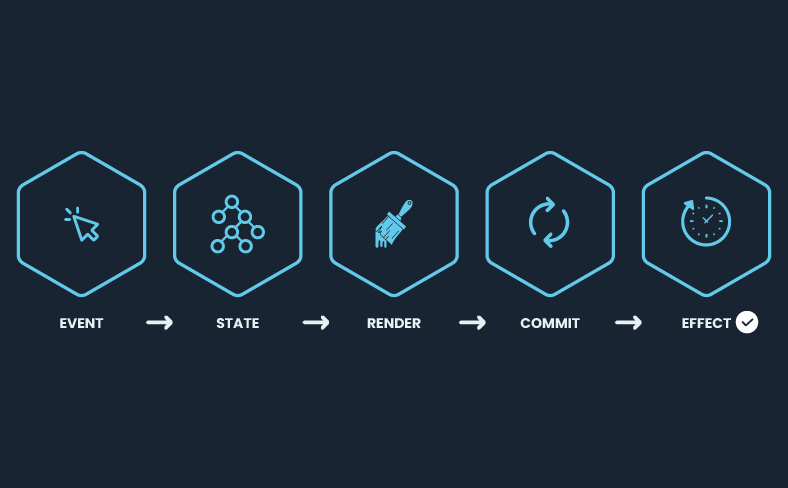
Events → state → render → commit → effects
What each step means
- Event
A user (or program) triggers something: a click, input, timer, promise resolution, etc. Your handler runs synchronously. - State
Inside that handler (or callback), you callsetState. This schedules an update. In React 18, updates from the same tick are auto-batched. - Render (reconcilliation)
React computes the next UI purely from props/state. No DOM changes yet. In concurrent mode this can be started, paused, or thrown away and restarted. Side effects must not happen here. - Commit
React applies the changes: DOM mutations, refs, layout. This is when the screen actually updates. If you need to read layout synchronously after DOM writes, that’s whatuseLayoutEffectis for (it runs after commit, before paint). - Effects
“Passive” effects (useEffect) run after paint. Network requests, logging, subscriptions. Anything that shouldn’t block painting goes here.
Event handlers run synchronously, but React batches setState and commits after the handler.
useEffect runs after commit if state changes in an effect or a promise, your test must await the resulting DOM change.
In RTL:
- Prefer
findby*for async UI (it includes waiting) - Use
waitForwhen you need to wait for arbitrary conditions - Use fake timers to control
setTimeout/Debounce - Use MSW or lightweight mocks for network calls
Pattern 1 – Synchronous state updates (no waiting needed)
Component
function Toggle() {
  const [on, setOn] = React.useState(false);
  const handleToggle = React.useCallback(() => setOn(v => !v), []);
  return (
    <button onClick={handleToggle}>
      {on ? "On" : "Off"}
    </button>
  );
}
Test
import { render } from "@testing-library/react";
import userEvent from "@testing-library/user-event";

test("toggles immediately on click", async () => {
  const user = userEvent.setup()
  const { getByRole } = render(<Toggle />);
  const btn = getByRole("button", { name: /off/i });
  await user.click(btn); // userEvent already wraps updates properly
  expect(btn).toHaveTextContent(/on/i); // no wait needed
});
Signal: If the update is triggered directly in the event handler, you usually don’t need waitFor.
Pattern 2 – Async updates via promises (await the UI, don’t guess timing)
Component
type Props = { save: () => Promise<void> };

function SaveButton({ save }: Props) {
  const [status, setStatus] = React.useState<"idle"|"saving"|"saved"|"error">("idle");
  const onClick = async () => {
    setStatus("saving");
    try {
      await save();
      setStatus("saved");
    } catch {
      setStatus("error");
    }
  };
  return (
    <div>
      <button onClick={onClick} disabled={status === "saving"}>Save</button>
      <span aria-live="polite">{status}</span>
    </div>
  );
}
Test (mock the promise, await the DOM)
import { render} from "@testing-library/react";
import userEvent from "@testing-library/user-event";

test("shows saved after successful save", async () => {
  const user = userEvent.setup();
  const save = vi.fn().mockResolvedValue(undefined); // or jest.fn()
  const { getByRole, findByText } = render(<SaveButton save={save} />);

  await user.click(getByRole("button", { name: /save/i }));

  // Don't wait on the promise directly; wait on the UI:
  expect(await findByText(/saved/i)).toBeInTheDocument();
});
Why this works: findByText polls until the text appears or times out. You avoid flaky sleeps and align the test with user-visible results.
Pattern 3 – Timers and debounced updates (control the clock)
Component (debounced search)
import React from "react";

type SearchProps = {
  fetchResults: (q: string) => Promise<string[]>;
};

export function Search({ fetchResults }: SearchProps) {
  const [q, setQ] = React.useState<string>("");
  const [results, setResults] = React.useState<string[]>([]);

  const handleChange = React.useCallback(
    (e: React.ChangeEvent<HTMLInputElement>) => {
      setQ(e.target.value);
    }, []
  );

  React.useEffect(() => {
    if (!q) {
      setResults([]);
      return;
    }

    const id = setTimeout(async () => {
      const r = await fetchResults(q);
      setResults(r);
    }, 300);
    return () => clearTimeout(id);
  }, [q, fetchResults]);

  return (
    <>
      <label htmlFor="query-input">Query</label>
      <input
        id="query-input"
        aria-label="query"
        value={q}
        onChange={handleChange}
      />
      <ul>{results.map((r) => <li key={r}>{r}</li>)}</ul>
    </>
  );
}
Test (fake timers and user typing)
import { render} from "@testing-library/react";
import userEvent from "@testing-library/user-event";

beforeEach(() => {
  vi.useFakeTimers(); // or jest.useFakeTimers()
});
afterEach(() => {
  vi.useRealTimers();
});

test("debounces and shows results", async () => {
  const user = userEvent.setup();
  const fetchResults = vi.fn().mockResolvedValue(["alpha", "beta"]);
  const { queryByText, findByText } = render(<Search fetchResults={fetchResults} />);

  await user.type(screen.getByLabelText(/query/i), "a");
  // Nothing yet because of debounce:
  expect(queryByText(/alpha/i)).not.toBeInTheDocument();

  // Advance time to trigger the effect:
  vi.advanceTimersByTime(300);

  // Await the UI change after the promise resolves
  expect(await findByText(/alpha/i)).toBeInTheDocument();
  expect(fetchResults).toHaveBeenCalledWith("a");
});
Tips
- Always advance timers to the exact debounce delay.
- After advancing, still await the UI (findBy*) because a promise resolves after the timer callback.
Pattern 4 – Fetch in useEffect (mock or use MSW)
Component (basic fetch)
function UserList() {
  const [users, setUsers] = React.useState<string[] | null>(null);
  const [error, setError] = React.useState<string | null>(null);

  React.useEffect(() => {
    let cancelled = false;
    (async () => {
      try {
        const res = await fetch("/api/users");
        if (!res.ok) throw new Error("HTTP " + res.status);
        const data: string[] = await res.json();
        if (!cancelled) setUsers(data);
      } catch (e: any) {
        if (!cancelled) setError(e?.message ?? "error");
      }
    })();
    return () => { cancelled = true; };
  }, []);

  if (error) return <p role="alert">Failed: {error}</p>;
  if (!users) return <p>Loading…</p>;
  return <ul>{users.map(u => <li key={u}>{u}</li>)}</ul>;
}
Test (MSW recommended)
// With MSW, define a handler for GET /api/users returning JSON.
// In test:
import { render} from "@testing-library/react";

test("renders users from API", async () => {
  const { getByText, findByRole, getAllByRole } = render(<UserList />);
  expect(getByText(/loading/i)).toBeInTheDocument();

  // MSW serves the response; await the UI:
  expect(await findByRole("list")).toBeInTheDocument();
  expect(screen.getAllByRole("listitem")).toHaveLength(3);
});
Withour MSW (quick mock)
beforeEach(() => {
  global.fetch = vi.fn().mockResolvedValue({
    ok: true,
    json: async () => ["Ada", "Linus", "Grace"],
  } as any);
});

test("renders users from API", async () => {
  const { findByText } = render(<UserList />);
  expect(await findByText(/Ada/)).toBeInTheDocument();
});
Pattern 5 – Updating from props/external events (use rerender and findBy*)
import { render} from "@testing-library/react";

function Status({ ready }: { ready: boolean }) {
  const [text, setText] = React.useState("Booting…");
  React.useEffect(() => {
    if (ready) setText("Ready");
  }, [ready]);
  return <div>{text}</div>;
}

test("updates when prop changes", async () => {
  const {
    rerender,
    getByText,
    findByText,
  } = render(<Status ready={false} />);
  expect(getByText(/booting/i)).toBeInTheDocument();

  rerender(<Status ready={true} />);

  // Effect runs after commit → await the new text
  expect(await findByText(/ready/i)).toBeInTheDocument();
});
When to use what
- Direct event → immediate DOM change:
getBy*anduserEvent(no waiting). - Async side effects (fetch, promise, effect):
findBy*for the target element. - Complex conditions:
waitFor(() => expect(...)). - Timers/debounces: fake timers and
advanceTimersByTime, thenfindBy*. - Transitions or Suspense: still
awaitthe user-visible state (findBy*orwaitForElementToBeRemovedfor spinners).
Common anti-patterns (and fixes)
| ❌ | await new Promise(r => setTimeout(r, X)) in tests |
| ✅ | Wait for UI with findBy* or advance timers deterministically. |
| ❌ | Asserting internal state (implementation detail) |
| ✅ | Assert what the user sees (text, buttons enabled/disabled, aria-live, etc.). |
| ❌ | Forcing act everywhere |
| ✅ | RTL’s helpers already wrap updates. Reach for act explicitly only when you manually tick timers or resolve promises in unusual ways. |
| ❌ | Mocking too low (e.g., stubbing useEffect or setState) |
| ✅ | Mock I/O boundaries (network) or time, not React internals. |
Minimal checklist for stable async tests
- Prefer
findBy*for async UI,getBy*for sync. - Use fake timers for debounces/throttles and advance them.
- Mock network at the boundary (MSW or
global.fetch) - Wait for removals with
waitForElementToBeRemoved(eg Spinners) - Clean up timers/mocks in
afterEach - Keep assertions focused on the user-visible outcomes.
Bonus – Testing hooks directly
Test state in hook
import { renderHook, act } from "@testing-library/react";

function useCounter() {
  const [n, setN] = React.useState(0);
  const inc = () => setN(v => v + 1);
  const incAsync = () => setTimeout(inc, 200);
  return { n, inc, incAsync };
}

test("hook: async increment", () => {
  vi.useFakeTimers();
  const { result } = renderHook(() => useCounter());
  act(() => result.current.incAsync());
  vi.advanceTimersByTime(200);
  expect(result.current.n).toBe(1);
  vi.useRealTimers();
});
Wrap up
Testing state and async side-effects in React becomes straightforward once you
- Think in terms of what the user sees, not internal state.
- Await the DOM, not arbitrary time
- Control time and network at the edges.
Resources
Looking for developers that build React test scripts? Reach out