

How slowing down to speed up using spec-driven development works
I’ve been using Cursor for about nine months now, and while the speed of “Agent” mode is impressive for initial builds, the transition from a proof-of-concept to production-grade code remains a significant hurdle. It’s the classic 90/90 rule: the first 90% of the project takes 90% of the time, and the final 10%, the robust guardrails, monitoring, and fine-tuning which takes the other 90%.
In its default state, the agent is often over-eager. It might build a UI with perfect-looking buttons that aren’t actually wired up, or implement logic that looks correct but fails to capture the nuanced intent of a natural language prompt. More concerning is its lack of broader context. Because the AI doesn’t “know” your system, it can make changes with unintended side effects, even updating your tests to match its new, incorrect logic, without ever questioning the scope.
This creates a massive review bottleneck. Unlike reviewing a trusted colleague’s PR, where you can assume a certain level of linting, testing, and structural integrity, every AI change must be treated like it was written by a very fast, very confident intern. The cognitive load is high because you cannot rely on shared experience or “assumed knowledge.” As humans, we are wired for social communication and often fall into the trap of chatting with the AI as if it retains context like a peer. It doesn’t.
This friction scales with the size of the project. Even with 128k token windows, once you account for rules, codebase indexing, and tool responses, context runs out quickly. While highly modular monorepos help mitigate this, the core issue remains: to get optimal results from an AI, you have to provide the discipline and structure that the model inherently lacks.
Exploring the spec-driven approach
Recently, I experimented with Kiro to see how it handled these workflow gaps. I was specifically drawn to its “Spec-Driven Development” model, which enforces the disciplined structure that Cursor’s impulsive agent lacks.
However, the experience was jarring. Moving from the polished, fluid environment of Cursor to an application that felt sluggish and error-prone was difficult. My experience was further soured by Kiro locking my account for no real reason and misleading instructions that required quite a lot of googling and AWS support ticket to resolve. While I valued Kiro’s structured workflow, the tool itself lacked the “completeness” and reliability I’ve come to expect from Cursor.
The experiment: bringing structure to Cursor
This led to a simple question: Could I use Cursor’s capabilities to build the guardrails I liked in Kiro?
I wanted to replicate that disciplined workflow without leaving the Cursor ecosystem. Using Planning Mode, I drafted a set of .cursor/rules/<file name>.mdc and .cursor/skills/<skill name>/SKILL.md files. The goal was to programmatically instruct the agent to follow a linear governance path:
- Requirement Documentation: Formalise functional needs.
- Validation: Pause for human review.
- Design Phase: Translate requirements into a technical design document.
- Architecture Review: Sign off on the tech stack and approach.
- Tasking: Break the design down into a granular implementation checklist.
- Final Check: Verify the task list against the design.
- Implementation: Execute only after the previous steps are verified.
I asked Cursor to define its rules in order to follow the workflow I wanted and it created a number of rules including this Order of Work to ensure the agent understands the lifecycle of a feature:
## Order of work

1. **Requirements** — `requirements.md` in the feature folder (EARS-style acceptance criteria, glossary, numbered requirements). Human must review and accept before design.

2. **Design** — `design.md` (markdown, mermaid, key decisions, data contracts, **Correctness properties** with “Validates: Requirements …” where used). Human must review and accept before tasks.

3. **Tasks** — `tasks.md` (checklist, `_Requirements: n.m_` traceability, optional **Property** subtasks, **Validates** lines). Human must review and accept before implementation. Title may be **Implementation Plan: …** to match the repo.

4. **Implementation** — build a Cursor **Plan** from the accepted `tasks.md`, then execute it in Agent mode. **As each task is completed,** update `tasks.md` and set the matching checklist item to `- [x]` (see skill **sdd-execute-plan**). The **implementation** breakdown lives here: it is not invented earlier in the pipeline.
The rules it created also provided explicit instructions on Artefact Paths to keep the project structure predictable:
## Artifact paths

- Use a URL-safe folder name: kebab-case for `<feature-name>` (e.g. `user-notifications`, `export-csv`).
- Prefer **`docs/<feature-name>/`**, or **`.kiro/specs/<feature-name>/`** if the project uses Kiro-style specs. Same three file names in either case.

| Phase | File |
|-------|------|
| Requirements | `.../requirements.md` |
| Design | `.../design.md` |
| Tasks / plan | `.../tasks.md` (often titled *Implementation Plan*) |
To ensure the quality of the content within the artefacts, I instructed the cursor to construct the associated Skills for instructing the agent how to structure specific artefacts. For example, a requirement must follow a strict format:
4. **Requirements** — for each: `### Requirement <N>: <Title>`
   - **User story:** *As a …, I want …, so that …*
   - **#### Acceptance criteria** — ordered list. Prefer **EARS** style:
     - *THE* **System/Component** *SHALL* …
     - *WHEN* …, *THE* **X** *SHALL* …
     - *IF* …, *THEN* **THE** *X* …
     - *WHILE* …, *WHILE* …, *FOR ALL* …
   - Number each criterion (1, 2, 3) so `tasks.md` can cite **Requirement N** and `N.M` for a specific line.
The results in practice
By embedding these instructions into the project rules, I saw an immediate shift in the agent’s behaviour, particularly in Planning Mode. The plans became consistent, structured, and focused on the creation of the design artefacts rather than jumping straight to the code.
id like to build a todo app
i would like it to allow a user to add todo items
i would like it to allow a user to complete todo items
i would like it to allow a user to delete todo items
i would like a user to be able to re-order items using drag and drop functionality
i would like the application to be a web page
it should use local db persistance to store the todo items
it should use typescript
it should use react
it should use vite build and skip the unit tests becuase this is an experiment
it should use MUI components
Under this new workflow, the initial plan always resulted in four distinct “Todo” items for the agent:
- Create the
requirements.mdfile. - Create the
design.mdfile. - Create the
tasks.mdfile. - Build from each of the tasks in
tasks.md.
Previously, I might have reviewed a high-level plan and hit “Apply” for the whole thing. The issue with the “all-at-once” approach is that if you generate your implementation tasks before the requirements or design are finalised, you end up in a loop of constant manual corrections.
Instead, I found that by selecting a single item from the plan, Cursor allows you to execute just that task in a new agent. This forces a pause: you generate the requirements, review and edit them, and only once they are accepted do you move to the design phase.
in a single pass-though using this method i ended up with a the following artefacts:
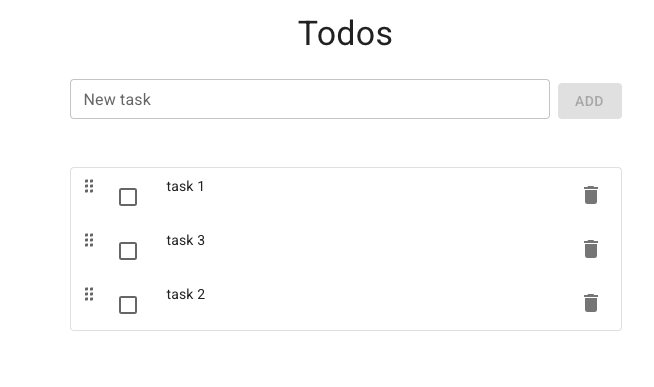
and a working app
Conclusion
While this isn’t a “fully automated” workflow, that is exactly the point. It forces the process to slow down, requiring the developer to specify exactly what is needed in high detail. Because the requirements and designs are generated within Cursor’s planning mode, they remain highly relevant to the codebase. It turns the agent from an impulsive coder into a disciplined engineering partner.
Speed is easy. Quality is harder.
If you want both, we can help you implement spec-driven workflows that scale beyond proof-of-concept. Contact us to start the conversation.